
As previous years GrowthWheel has a Certification Course right before the America’s SBDC's Annual Conference 2016 so participants can make the most of their trip. This course will have participants joining from SBDC’s all over the country.
First course scheduled in Chicago
Happy to welcome first ever GrowthWheel Certified Advisor in Alabama
On July 19-20 we were back in Oklahoma for the second time this year. The Certification Course took place at Moore Norman Technology Center and was organized in partnership with Oklahoma CareerTech who had gathered representatives from the ecosystem around Oklahoma City.
New Certification Course scheduled in Pretoria, South Africa on August 30-31
First ever Certification Course in Lebanon. Now counting 34 countries.
On July 14-15 we were in the Beirut for the first ever GrowthWheel Certification Course in Lebanon. The course was organized in partnership with Berytech and with stakeholders from the entire vibrant Beirut entrepreneurship eco-system, including incubators, accelerators, small business support offices, business angels, and entrepreneurship educators.
New Release: Keep Track of Client Meetings

Log and share all client interactions
- Track decisions and actions. Share with clients.
This month we are happy to introduce a new way to track your work with clients. Today you will find a new menu called “Interactions”. Here you can track each interaction you have with your clients, and add decision and actions discussed during your meeting. When ready you can download all interactions as a PDF that you can upload to your CRM-system.
Log in to GrowthWheel Online today to see:
- The new menu “Interactions” under each of your clients
- A new way to invite clients you created as draft
- New visual icons for decisions, actions, and notes
- Edit decisions and actions directly in the 30-60-90 Day Plan
Step 1: Go to the new interaction menu
You can now log all interactions with your clients, and keep track of the decisions and actions you discuss during your meeting. Go to the the client’s menu and you’ll see the new menu “Interactions".
Step 2: Create a new interaction
It is easy to create a new interaction: Just name the interaction, select type, and set the date and time. Like with the Online 360° Screening tool, you can decide to keep the interaction as a draft or save and share it with your client. If you share it your client will be able to see a PDF of the interaction.
Step 3: Add Decisions and Actions
You can log any decisions or actions you and your client have discussed during your meeting. The decisions and actions from your shared interaction will also be visible for your clients in the 30-60-90 Day Plan.
Second Course in Norway
2000 advisors certified since 2008
The course in Copenhagen on June 21-22 was a milestone for GrowthWheel as we passed advisor no. 2000 to be certified since the first business advisor had a GrowthWheel Certificate in 2008.
By an appropriate coincidence advisor no. 2,000 was a business advisor from Væksthus Syddanmark (GrowthHouse Southern Denmark) where also the first ever group of advisors was certified back in 2008.
A great welcome to the new GrowthWheel Certified Advisors in Columbus
On June 9-10 we visited Columbus, OH for another Certification Course. This course was evenly split between new advisors coming in for a certification and advisors coming in for a re-certification. Ohio SBDC is ramping up - adding another 10 advisors, and the state now has 41 GrowthWheel Certified Advisors in the SBDC network.
New Release: Big Data
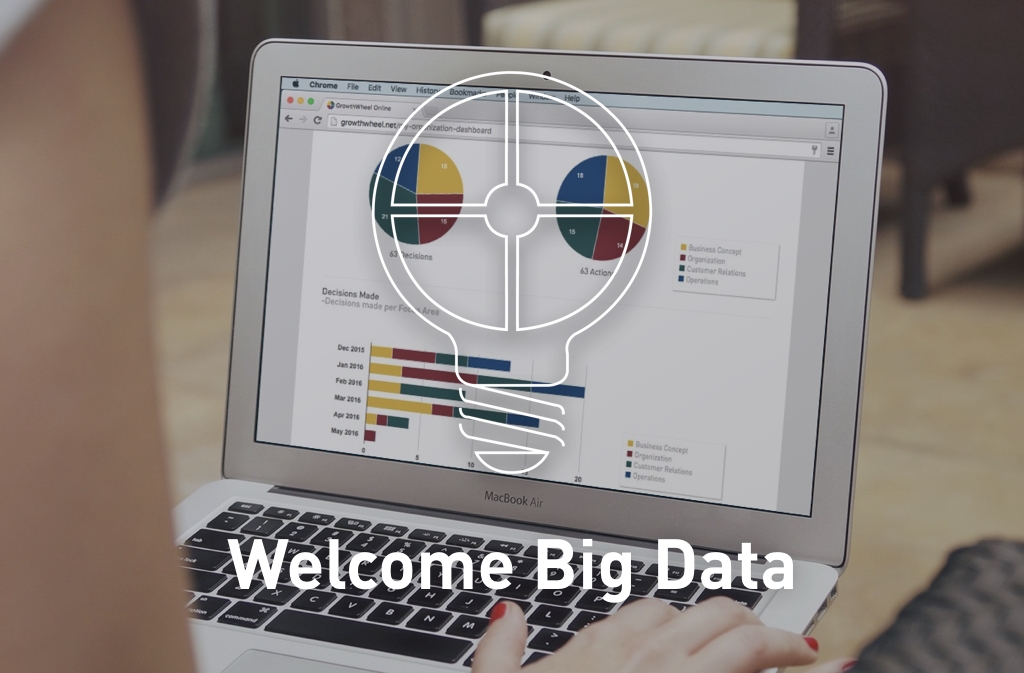
Monitor clients' progress month by month
- Use big data to make your own decisions
With our June release, it is now possible to track your clients’ progress in a way that has never been possible before!
We are introducing two new charts in the Dashboard Menu so you can monitor all your clients’ completed decisions and actions, whether they are added to the cloud by you or your clients. With the latest features in GrowthWheel Online Beta you can see this on the updated dashboard:
• Decisions and actions completed per month for each client
• Aggregated data for all your clients, your organization, and your entire network
• Amount of work completed for each of the four main work areas in the business
With a bird's eye view on how many decisions and actions clients are executing you can make better decisions on which clients to spend your time on, and also see if some areas are in need of more attention.
New Menu: All Clients Dashboard
- Follow your clients' progress

In the new menu, "All Clients Dashboard", you can see the total amount of completed decisions and actions each month for all your clients.The two charts show the decisions and actions grouped by work area so you can easily see within which areas you have been working and when.

The monthly charts that you find in the "All Clients Dashboard" show the aggregated data of all your clients. You can also see monthly charts for each individual client. Choose a client from your client list and click on Client Dashboard.
Get GrowthWheel certified in Oklahoma!
GrowthWheel visits the Middle East
We are exited to be back in the Middle East for the first time in several years. We are proud to organize this course in partnership with the leading incubator in Lebanon - Berytech.
We expect participants from several countries in the Middle East for this course, including Kuwait, Egypt and Lebanon.
GrowthWheel in South Africa once again
Happy to welcome 10 Canadian advisors
On May 12-13 we were back in Toronto for the second Certification Couse in Canada this year. We were very proud to partner up with Enterprise Toronto and the first three centers in their network in the Greater Toronto Area.